Unlock AI Content Workflows for Agencies: One-Click HitPublish
AI content workflows have long been a maze of handoffs, spreadsheets, and misaligned calendars. Agencies today face a choice: preserve the legacy method with its friction, or adopt a streamlined, all‑in‑one system that eliminates manual copying, bottlenecks, and errors. You want a scalable solution that can manage multiple WordPress sites, publish SEO‑savvy articles across client accounts, and do it with a single click. This piece maps a practical, step‑by‑step path from legacy processes to an all‑in‑one platform that promises Zero Copy, Zero Paste, and instant publishing. It’s designed for marketers who must deliver consistent quality at speed while maintaining control, transparency, and measurable results.
Introduction to the problem and the new approach
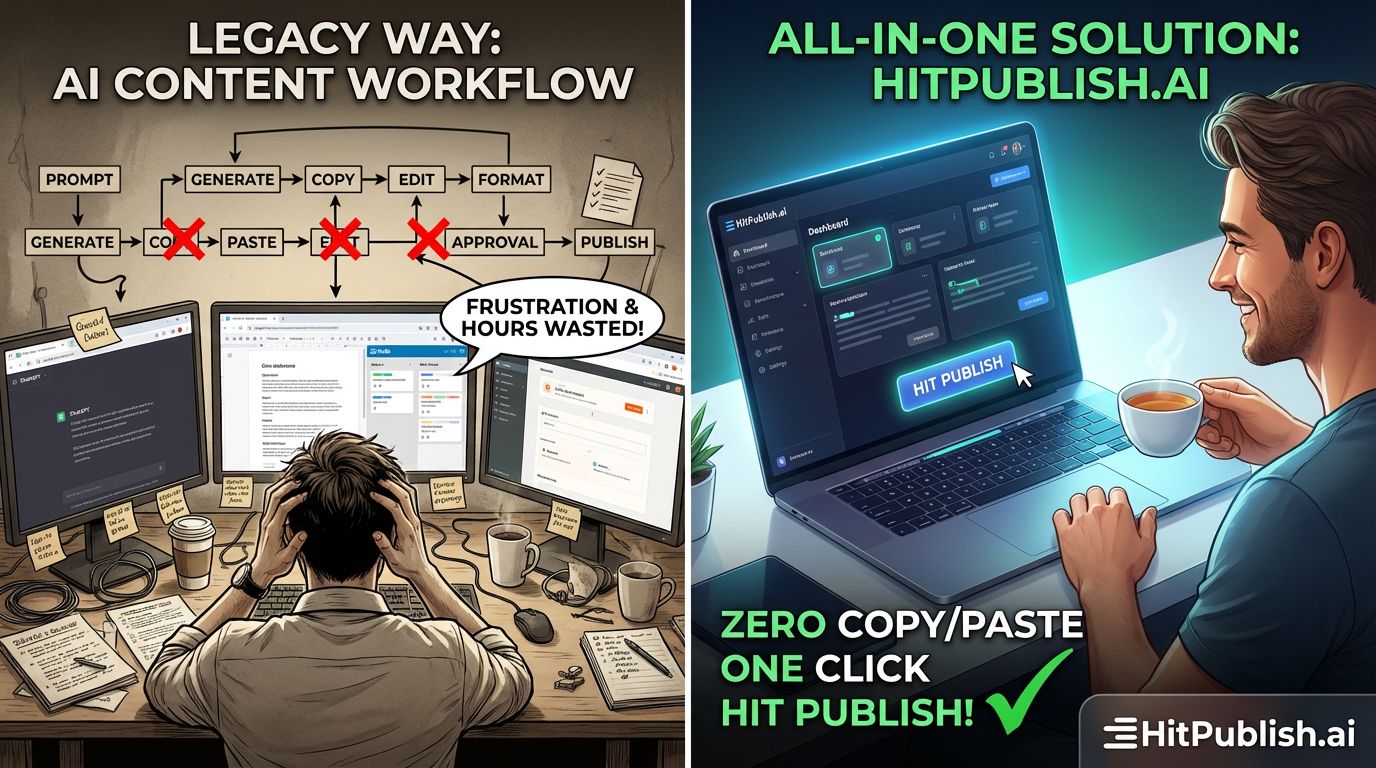
The old workflow requires content briefs, drafts in Word or Google Docs, back‑and‑forth approvals, SEO checks, and manual transfers to CMS editors. Each handoff increases the chance of errors, delays, and scope creep. The all‑in‑one solution consolidates ideation, drafting, SEO optimization, review, and publish steps into a unified process. It leverages AI to generate and optimize content, connects directly to WordPress client sites, and handles scheduling, publishing, and analytics at scale. The result: fewer touchpoints, fewer tools, faster time to live, and more predictable outcomes for clients and internal teams. This isn’t theoretical; it’s a practical upgrade path that aligns with how agencies actually work under pressure.
Overview of the step‑by‑step workflow (legacy vs. all‑in‑one)
Transitioning from the legacy workflow to the all‑in‑one approach involves rethinking roles, replacing tools, and remodeling governance. The following stage‑by‑stage comparison highlights concrete actions you can take to modernize operations while preserving quality and accountability.
Stage 1 — Brief and planning
Legacy: briefs exist in emails or documents; approvals are scattered across stakeholders; content scope is loosely defined. All‑in‑one: centralized brief templates capture intent, audience, keywords, and constraints; AI suggests content directions; approval routing is automated with version control and timestamps. Actionable tip: create a standard brief header with target keywords, tone, and publication date; require sign‑off from a primary client contact before drafting starts.
Stage 2 — Ideation and outline
Legacy: writers brainstorm in isolation, then email outlines; feedback loops extend timelines. All‑in‑one: AI helps generate outlines aligned to SEO goals and client topics; editors approve outlines in one place; content blocks are reusable across client sites. Actionable tip: store outlines as modular blocks that can be repurposed for future articles across multiple WordPress sites.
Stage 3 — Drafting and optimization
Legacy: drafts move between doc editors and SEO tools; formatting is manual; keyword integration is inconsistent. All‑in‑one: generate draft content directly within the platform; automatic SEO scoring and readability checks run in real time; semantic optimization and internal linking are suggested and applied at publish. Actionable tip: enable AI to produce multiple tone variants and select the best fit for each client persona.
Stage 4 — Review and approvals
Legacy: approvals require multiple rounds; version control is poor; bottlenecks kill velocity. All‑in‑one: a single review workspace shows tracked changes, comments, and status; stakeholders can approve with one click; time stamps enforce accountability. Actionable tip: set SLAs per client, with automated reminders and escalation if thresholds are missed.
Stage 5 — Upload and publish
Legacy: manual CMS entry; inconsistent metadata; post‑publish tasks are forgotten. All‑in‑one: publish directly to WordPress sites with automated metadata, featured images, alt text, and SEO snippets; one‑click publish across multiple client sites; post‑publish checks verify indexing and social previews. Actionable tip: build a publish checklist that automatically runs post‑publish checks and notifies the team of any issues.
Stage 6 — Analytics and iteration
Legacy: analytics pulled from assorted dashboards; insights are late; iterating content underperforms. All‑in‑one: centralized analytics dashboards track performance across all WordPress sites; AI suggests optimization actions; content updates can be scheduled in mass for evergreen assets. Actionable tip: implement monthly content audits that surface underperforming posts and propose replacements or updates.
Key features of the all‑in‑one solution for agencies
Below are the capabilities that directly address common pain points in multi‑site management, SEO, and collaboration across teams and clients. These features are not theoretical; they’re designed to be implemented in real agency environments with minimal friction.
Zero Copy / Zero Paste
The system eliminates manual copy/paste between tools. Content, SEO metadata, and publication instructions flow automatically from generation to WordPress sites. This reduces errors and dramatically speeds up production. Case in point: a mid‑sized agency moved from a two‑day content cycle to a two‑hour one by removing manual transfers. Actionable tip: map all data touchpoints and enforce a single source of truth for every asset.
One‑click Publish across multiple WordPress sites
Publish content to unlimited WordPress sites with one action. This is a major lever for agencies handling many clients; it ensures consistency, reduces per‑site setup time, and simplifies governance. Practical example: a digital marketing firm controlling 15 client sites can roll out a new article template across all sites in minutes rather than hours.
AI‑driven SEO optimization
SEO checks occur automatically, including keyword density, internal linking, meta tags, alt text, and readability. The platform suggests optimization actions at the paragraph or sentence level and applies them with a click. Realistic outcome: higher search visibility without manual SEO toil. Tip: align AI suggestions with client SEO strategy, not just generic best practices.
Unified collaboration space
All actors—writers, editors, SEOs, account managers, and clients—work in a single collaborative environment. Change history, comments, and approvals are visible to all stakeholders, reducing back‑and‑forth and ensuring ownership. Benefit: predictable timelines and improved client satisfaction. Tip: establish role‑based dashboards so each participant sees precisely what they need to act on.
Multi‑site governance and templates
The system supports standardized templates and governance rules across all client sites. This ensures brand consistency, streamlines set‑up for new sites, and reduces the cognitive load on editors. Example: an agency can deploy a new article format with consistent SEO snippets across 30 sites in a single configuration change.
AI content generation tailored to clients
AI models are trained on client‑specific voice, tone, and audience data, delivering content that sounds authentic to each brand. This reduces editing time and improves audience resonance. Note: maintain oversight to guarantee accuracy and alignment with client policies. Tip: segment clients by voice style and maintain a simple style guide within the platform.
Compliance, security, and access controls
Granular permissions and audit trails ensure compliance with client requirements and data governance standards. Agencies can control who can draft, approve, publish, or modify assets. Benefit: reduced risk and clearer accountability. Actionable tip: implement quarterly access reviews and automatic credential rotation for high‑risk roles.
Case studies and practical examples
Case 1: Growth Studio, a marketing agency managing 12 WordPress clients, implemented the all‑in‑one workflow and achieved a 65% faster publication cycle. They replaced separate drafting tools, SEO apps, and CMS editors with a single platform. The impact: more billable hours redirected to strategy and higher client retention. Case study takeaway: unify core steps to unlock velocity without sacrificing quality.
Case 2: BrightScale Digital handles multinational clients with diverse languages. After adopting multi‑site governance and AI‑driven localization, they reduced translation and localization costs by 40% and kept consistent SEO signals across markets. Example: an article about “AI in marketing” could be localized for three regions with a single click, while maintaining link structure and SEO elements. Quote: “Automation without governance is chaos; governance without automation is inefficiency.”
Case 3: Verde Labs, a boutique agency, used the platform to launch a new service line: evergreen content for all client sites. They publish monthly evergreen assets and refresh them automatically based on performance signals. Result: stable traffic growth and easier client reporting. Insight: evergreen assets scale beautifully when combined with centralized analytics and automated updates.
Best practices for implementation
To maximize impact, apply these pragmatic practices rather than chasing every bell and whistle. You are optimizing for reliability, speed, and measurable outcomes across multiple WordPress sites.
1) Start with governance and templates
Define a standard set of templates and rules for every client site. This makes onboarding faster and ensures consistency. Actionable tip: build a template library with core blocks for titles, intros, H2s, meta descriptions, and CTAs. Use a fixed schema for SEO metadata so automation is reliable.
2) Align AI with client strategy
AI should reflect client voice, not generic messaging. Train models on client examples, provide style guidelines, and maintain a live feedback loop. Tip: run quarterly model refreshes and solicit client feedback on generated content to keep voices aligned.
3) Instrument the process with metrics
Track velocity, quality, and impact. Metrics should include publish cycle time, edit iterations, SEO scores, and post‑publish engagement. Actionable tip: set targets for each metric per client and review monthly to detect drift early.
4) Maintain transparency for clients
Provide clients with dashboards showing work in flight, performance metrics, and upcoming publishing calendars. Benefit: trust and smoother approvals. Tip: offer self‑serve reporting access with export options to support client audits or quarterly business reviews.
5) Plan for scale
As you add clients, ensure you can reproduce processes across sites without blowing up governance. Actionable tip: segment clients by industry and create tailored templates and AI prompts per segment to accelerate ramp‑up for new accounts.
How to measure success and ROI
ROI hinges on time saved, quality maintained, and client outcomes improved. The all‑in‑one approach should demonstrate clear wins in per‑piece production time, cross‑site consistency, and SEO impact. For example, a marketer can compare pre‑ and post‑implementation publish cycles, noting how one click replaces multiple manual steps. The payoff: more capacity for strategic work, higher client satisfaction, and faster revenue realization. A practical method is to track three KPIs: average cycle time per article, on‑site engagement (time on page, scroll depth), and organic search performance (rank changes for targeted keywords). A disciplined evaluation schedule ensures you capture the real effects of the transition and adjust tactics as needed.
“Automation is not a shortcut to better work; it’s a framework that makes consistently better work possible.” — Industry analyst
Technical considerations and setup checklist
Implementing an all‑in‑one system requires attention to data integrity, security, and integration reliability. Use this concise checklist to guide your setup and avoid common stumbling blocks.
- Inventory client sites and map to a single publish target framework.
- Define roles, permissions, and audit requirements for each team member.
- Configure AI prompts to match client voice and provide fallback content if needed.
- Set up automated metadata generation, including titles, descriptions, and alt attributes.
- Establish publish scheduling rules and cross‑site coordination logic.
- Implement post‑publish checks and alerting for failures or indexing issues.
As you implement, pay attention to cross‑site SEO consistency. Align internal linking strategies across client sites to strengthen authority signals and improve indexation. The platform shines when it preserves a unified content taxonomy, so invest time in taxonomy planning early. For instance, define a centralized topic cluster strategy that can be propagated across all client sites with a single configuration change. According to HitPublish’s methodology, streamlining content workflows reduces operational friction and accelerates time to publish.
Another practical example involves client onboarding. Create an onboarding playbook that captures: client goals, preferred tones, publishing cadence, and approval SLAs. Then, reuse it for new clients to shorten ramp time. The more you standardize, the more you realize the benefits of one‑click publishing across unlimited WordPress sites. This approach keeps teams focused on strategy, not repetitive setup tasks. Remember, the goal is to reach a state where the platform actively learns from your patterns and improves its recommendations over time. This is the essence of AI‑driven content orchestration for agencies.
Actionable insights and practical tips
These crisp tips translate theory into practice, enabling you to realize tangible improvements in your agency’s output and client value.
- Centralize content assets with a single source of truth to avoid version drift across sites.
- Leverage modular content blocks to accelerate reuse across posts and sites.
- Automate image selection and optimization, including alt text and canvas sizing, to save visual assembly time.
- Use AI to propose alternative headlines and meta descriptions for AB testing and improved CTR.
- Schedule periodic reviews of AI prompts and templates to maintain relevance and quality.
These steps aren’t theoretical fantasies; they’re actionable, repeatable, and designed to scale as you bring on more WordPress sites and clients. The all‑in‑one solution is built for agencies managing multiple WordPress clients, with a focus on publish speed, SEO excellence, and governance. It’s not a gimmick; it’s a disciplined workflow modernization that pays for itself through time saved and improved outcomes. You can implement this approach with careful planning, a clear governance model, and a willingness to let automation handle the repetitive parts while humans focus on strategy and client relationships.
Final thoughts and next steps
Adopting an all‑in‑one, AI‑driven workflow changes the game for agencies bound to scale. It reduces friction, accelerates delivery, and brings predictable success across multiple WordPress sites. Start with a focused pilot: select two or three representative client sites, implement templates, automate the draft‑to‑publish flow, and track the impact. Use the pilot to refine prompts, governance rules, and publish checks. If the pilot proves the value, roll out across all clients and maintain a tight feedback loop to keep the system aligned with evolving client needs. The future of agency content work is here, and it’s powered by one‑click, AI‑driven publishing across unlimited WordPress sites. This is not a marketing promise; it’s a practical, testable path to real results.