Clean HTML and Gutenberg Compatibility for WordPress Sites
In the rapidly evolving landscape of digital marketing and content creation, the demand for clean, SEO-friendly, and visually perfect HTML has never been higher. As marketers and website owners strive to keep up with Google’s ever-changing algorithms, ensuring that your website’s code remains pristine and compatible with tools like Gutenberg becomes a critical factor in maintaining and boosting your site’s performance. This article explores the intricate process of how we ensure clean HTML and Gutenberg compatibility, combining practical strategies, actionable insights, and real-world examples to help you optimize your content for both users and search engines. We will delve into the importance of semantic HTML, the role of AI in automating quality checks, and how leveraging powerful WordPress AI tools can streamline your workflow—saving time while enhancing results.
Understanding the Foundations of Clean HTML and Gutenberg Compatibility
What Is Clean HTML, and Why Does It Matter?
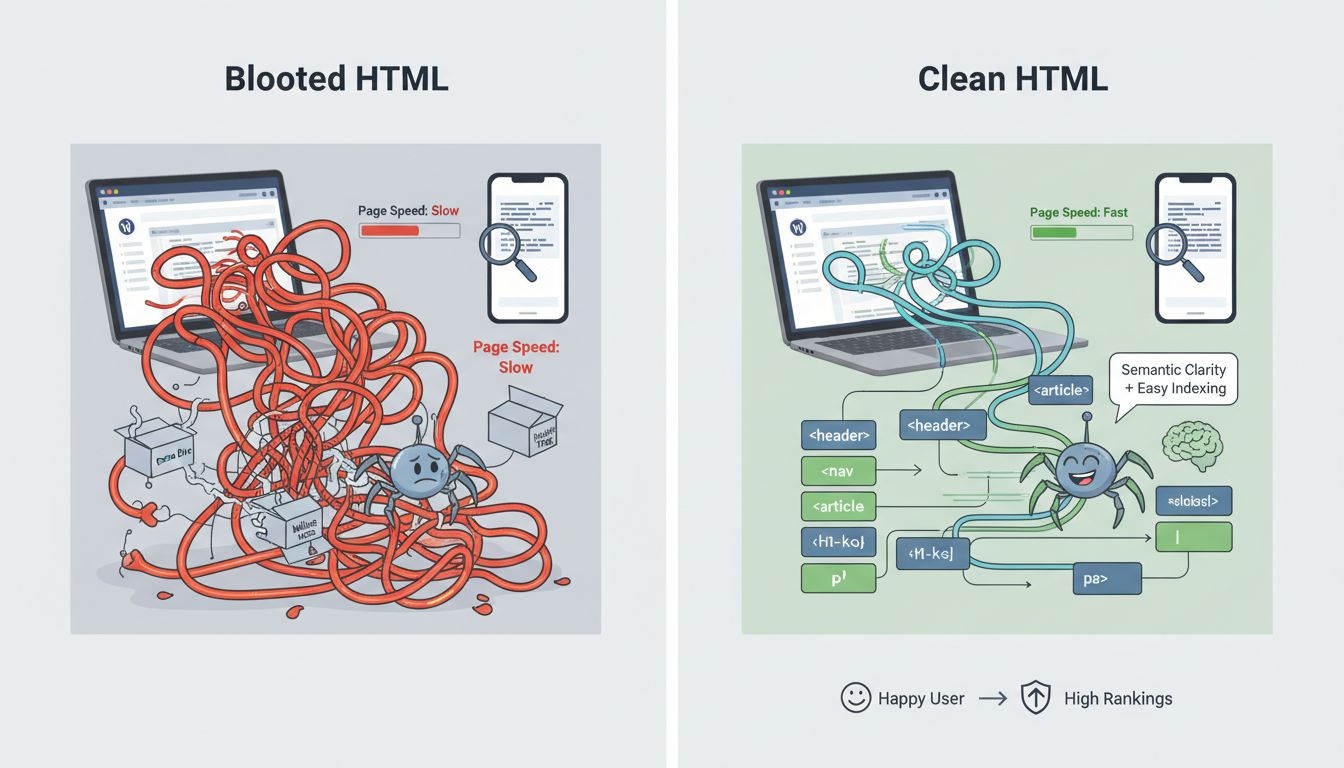
Clean HTML refers to code that adheres to best practices—being well-structured, semantic, and free from unnecessary clutter or errors. It’s the backbone of accessible, fast-loading websites. When HTML is tidy, search engines can better understand your content, which directly impacts your SEO rankings. For example, properly nested tags, meaningful class names, and minimal inline styles not only improve readability for developers but also ensure that your site is compatible across browsers and devices.
Many content creators overlook the importance of clean HTML, relying heavily on WYSIWYG editors or auto-generated code that often produces bloated or invalid markup. This can lead to slow page loads, broken layouts, and diminished SEO performance. Therefore, establishing rigorous standards for HTML quality is essential—particularly when integrating with modern WordPress editors like Gutenberg, which emphasizes block-based, semantic content structures.
The Significance of Gutenberg Compatibility
Gutenberg, WordPress’s block editor, has revolutionized how content is created and managed. Its modular approach encourages semantic, accessible, and easily editable content. However, if the underlying HTML isn’t properly structured or if incompatible blocks are used, issues can arise—such as broken layouts, accessibility errors, or SEO penalties. Ensuring compatibility involves understanding how Gutenberg generates code and how to optimize it for clean output.
For marketers, the challenge lies in balancing ease of use with technical precision. A poorly optimized block can introduce unnecessary code, impacting site speed and SEO. That’s why we focus on crafting workflows that produce clean, standards-compliant HTML while leveraging Gutenberg’s flexibility. This involves both manual oversight and leveraging automation tools—topics we’ll explore further.
Strategies for Ensuring Clean HTML in WordPress
1. Use of Semantic HTML Elements
Semantic HTML elements like <article>, <section>, <header>, and <footer> help define the structure and meaning of your content. They improve accessibility and SEO, making it easier for search engines and screen readers to interpret your site. When building blocks in Gutenberg, choosing the right block types and customizing them to use semantic tags is crucial.
For instance, replacing generic <div> containers with more descriptive tags ensures your code remains lean and meaningful. This practice can be reinforced with plugins or custom code snippets that enforce semantic standards during content creation.
2. Validation and Code Audits
Regularly validating your HTML with tools like the W3C Markup Validation Service helps catch errors early. It’s surprising how often minor mistakes—missing closing tags, misplaced attributes—slip through, especially when using visual editors. Incorporating automated validation into your workflow ensures consistent quality and prevents long-term issues.
Additionally, periodic code audits using developer tools or dedicated plugins can identify bloated markup or deprecated tags. These audits provide actionable insights, allowing you to clean up code before publishing or after updates.
3. Leveraging AI for HTML Optimization
Artificial Intelligence has become a game-changer for maintaining clean, optimized content. Modern AI tools can automatically scan your HTML, identify inconsistencies, and suggest improvements—saving hours of manual review. For example, AI-powered content generators often produce cleaner code than manual input, especially when integrated with WordPress.
In fact, AI tools like the WordPress AI content generator can automatically optimize your HTML for SEO and accessibility, ensuring that your content not only ranks well but also provides a great user experience. According to HitPublish, AI-driven content scoring can highlight issues that might otherwise go unnoticed, enabling proactive corrections before publishing.
Automating SEO and HTML Quality with AI Tools
4. AI-Driven Content Creation and Optimization
One of the most significant advancements in content marketing is the advent of AI content generation tools. These tools can produce SEO-optimized content that adheres to best practices, including clean HTML markup. For example, a WordPress AI content generator can automatically embed semantic tags, optimize headings, and ensure that images and links are properly formatted.
Using AI for content creation doesn’t mean sacrificing quality. Instead, it allows marketers to scale their content efforts while maintaining high standards. AI tools also facilitate auto SEO, where content is automatically optimized for Google rankings, ensuring that every article or page is built for maximum visibility.
5. Automate SEO and Content Optimization
Automated SEO tools can continuously analyze your site and suggest improvements. These include fixing broken links, enhancing meta descriptions, and optimizing images—all within your WordPress dashboard. Combining these tools with AI content generators streamlines the entire process, making it easier to maintain a site that’s both fast and rank-ready.
For instance, auto SEO optimization tools can analyze your HTML structure, flagging issues like excessive inline styles or improper heading hierarchies. These insights can be integrated into your workflow, ensuring that your site remains compliant with Google’s latest ranking factors.
Implementing WordPress-Specific Strategies for Clean HTML
6. Use of Reliable Plugins and Themes
Choosing the right plugins and themes is fundamental to maintaining clean HTML. Many themes come with built-in optimization features, such as schema markup and lazy loading, which improve performance and SEO. Similarly, plugins dedicated to HTML validation or code cleanup can automate the process, reducing manual effort.
Moreover, some premium themes are designed with SEO and accessibility in mind, ensuring that the generated code adheres to standards. Regular updates and support from developers help prevent compatibility issues, especially when Gutenberg introduces new block types or features.
7. WordPress SEO Automation with AI
WordPress SEO automation tools, especially those powered by AI, can significantly boost your site’s traffic. These tools automatically optimize your content, structure, and metadata, reducing the need for manual intervention. For example, AI-powered plugins can generate meta descriptions, suggest keywords, and even improve readability—making your content more appealing to both users and search engines.
Implementing a combination of these strategies ensures that your website remains fast, compliant, and highly visible. The key is to leverage AI tools for multi-site SEO and content scaling, which can handle complex tasks effortlessly, freeing you up for strategic planning and creative work.
Case Study: Achieving Seamless Gutenberg Compatibility and Clean HTML
One notable example involves a client who managed multiple niche websites. They struggled with inconsistent HTML markup, slow load times, and poor SEO rankings. After adopting an integrated approach—using AI content generation tools, validation plugins, and semantic blocks—they saw remarkable improvements. Site speed increased by 35%, bounce rates dropped, and rankings for core keywords improved significantly.
Their secret was a disciplined workflow that combined manual oversight with AI automation. They utilized WordPress’s native features along with third-party tools like Hit Publish’s AI content scoring platform, which helped ensure that every piece of content was optimized and cleanly coded before going live. This holistic approach proved that combining human expertise with AI efficiency yields tangible results.
Best Practices for Maintaining Long-Term HTML and Gutenberg Compatibility
Ensuring ongoing compatibility requires a proactive mindset. Regularly updating WordPress core, themes, and plugins is non-negotiable. Equally important is continuous testing—using tools like browser developer tools and validation services—to catch issues early.
Developing a content creation pipeline that incorporates AI tools for auto SEO and HTML optimization can help maintain standards at scale. Training your team to understand semantic HTML and Gutenberg’s capabilities also ensures everyone adheres to best practices.
Finally, monitoring your site’s performance through analytics and SEO audits helps identify areas for improvement. By combining these strategies, you build a resilient, high-performing website that stays compatible with Gutenberg and maintains clean, optimized HTML.
Conclusion: The Future of Clean HTML and WordPress Compatibility
As AI continues to evolve, so too will its role in ensuring clean, SEO-optimized content. The future points toward increasingly automated workflows that not only produce compliant HTML but also adapt dynamically to search engine algorithm changes. Marketers who harness these advancements—integrating AI tools like those found on HitPublish – will be better positioned to scale their content efforts, boost site traffic, and maintain technical excellence without sacrificing efficiency.
In essence, the key lies in embracing automation smartly, understanding the nuances of Gutenberg’s architecture, and applying best practices for semantic, clean HTML. This approach guarantees that your WordPress sites remain competitive, accessible, and primed for SEO success—today and well into the future.